
OopBuy Warehouse: Check What Is Ready to Move
Before a warehouse request, list which items have been received, which still need inspection and which are already assigned to a parcel. Keep the item link, option and quantity visible in each row.
Confirm the receiving destination before sending anything
If you need the OopBuy warehouse location for a delivery, obtain the receiving instructions for that specific order or service through your account or verified support. A company contact address, a parcel's transit scan and the destination assigned for warehouse receipt serve different purposes. Do not send goods to an address simply because it appears beside the company's name.
For an existing agent purchase, first identify the order and its seller-delivery record. If you want to arrange a separate delivery or return, confirm that the service accepts it and ask for the complete receiving instructions before booking transport. Do not assume that a return destination is the same as the original receiving facility or that a receiving address permits in-person collection.
| Detail to confirm privately | Why it matters |
|---|---|
| Which order or service accepts the delivery | Avoids applying instructions from an unrelated workflow |
| Recipient and address exactly as supplied | Keeps the shipment aligned with the intended receiving destination |
| Required identifying reference, if any | Helps establish how the incoming item will be associated with your record |
| Carrier-delivery and warehouse-receipt events | Separates a delivery scan from the item's recorded processing status |
Keep the instructions with your own shipment record. Ask support to resolve conflicting address versions instead of guessing a city, postcode or recipient from a community screenshot. An address also does not establish international delivery cost; that comparison needs the parcel information described in the shipping guide.
Decide what is ready for the parcel
QC images answer a visual question; they do not replace a packing record. Check the received quantity, the requested action and any consolidation choice before relying on a shipping estimate. A pending product can appear in a preliminary plan, but its assumed weight and dimensions must not be described as measurements of a completed parcel.
For a product reference, open the white graphic tee. Keep that public destination separate from warehouse evidence and note the date of each change in your private item record.
Find the event that starts the storage interval
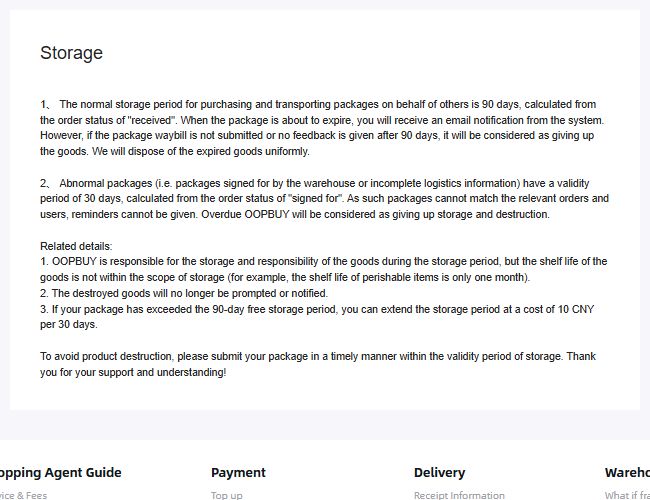
Policy capture saved on 10 September 2026. Use the two case descriptions to distinguish the relevant clock, not to infer a deadline from a product bookmark.
An older saved OopBuy Storage page distinguishes a normal 90-day period counted from “received” from a 30-day period counted from “signed for” for the abnormal or unmatched packages described there. Those starting events are not interchangeable with the date you first saved a product or paid for it.
The historical page also describes an extension costing 10 CNY per 30 days after the free period, and disposal when the stated conditions are exceeded. These are historical page terms, not a current deadline or extension offer for your item. Check the applicable conditions and the item's own dated record before deciding how long to wait.
Do not rely solely on receiving a reminder
The older wording limits reminders for unmatched packages and says disposed goods will not receive further notification. An absent message therefore cannot be treated as confirmation that an item remains available. If the receipt or matching status is unclear, ask support about that specific record rather than assigning the normal interval yourself.
Retain the reply and check the resulting record. An enquiry about storage does not itself extend a deadline, and a request to act does not prove that the action has been completed.
Resolve item questions before treating the set as final
Check whether each selected option and quantity is settled. If images show only part of an order, do not use them to confirm the whole set. The QC guide helps connect a view to the question it can answer, while order status separates item progress from parcel progress.
If you remove or replace a candidate, revisit the proposal's weight and packaging assumptions. Preserve the earlier version so you can understand a later difference instead of treating every quote change as unexplained.
Move to parcel planning with the relevant inputs
Use the shipping calculator guide to keep the destination, packed assumptions and selected service together. The shipping guide then addresses the parcel decision. Keep account references, addresses and private documents out of any public spreadsheet used to share product finds.